DocumentationWriting
Reading and revision
Readability scores, consistency checks against the book's own habits or a named style guide, and converting quotation marks.
Three tools that read the manuscript rather than set it. None of them changes the book unless you tell it to, and none of them appears in an exported file.
Readability
Scores and highlights for the chapter you are in.
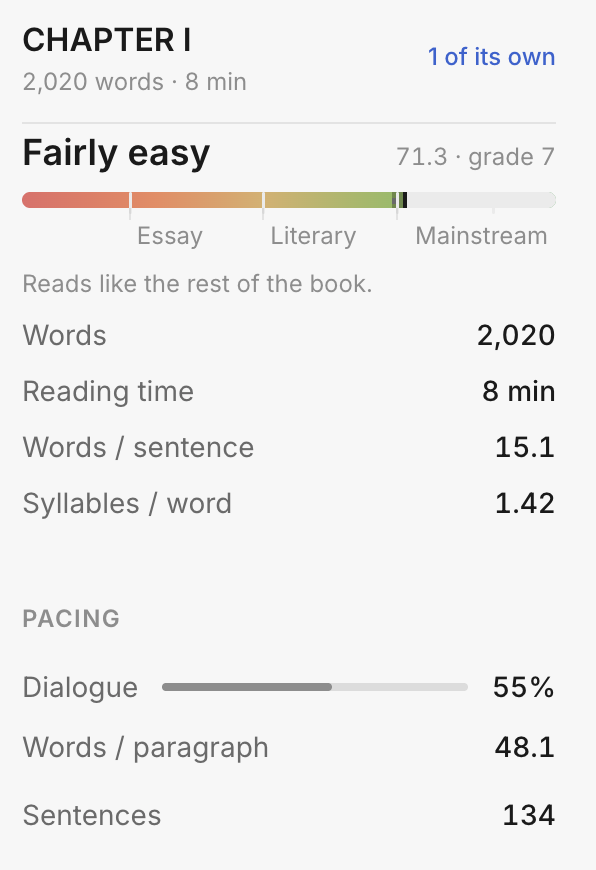
The gauge
A Flesch reading-ease score, with three bands marked:
| Band | Score | Typical of |
|---|---|---|
| Essay | around 20 | Academic and literary non-fiction |
| Literary | around 45 | Literary fiction |
| Mainstream | around 70 | Commercial fiction, most non-fiction |
The bands are reference points, not targets. A dense literary novel sitting at 30 is doing what it means to.
What is measured
Words, reading time, words per sentence, syllables per word. Under Pacing: the share of characters inside quotation marks (dialogue), words per paragraph, and sentence count.
Highlights
Switch on Highlight in the manuscript and the categories you have enabled are marked in the text itself:
| Category | Flagged when |
|---|---|
| Very hard sentences | Five separate readability formulas agree it is above about grade 14 |
| Hard sentences | The same five agree it is above about grade 10 |
| Complex words | Bureaucratic register with a plain equivalent (utilize, ascertain), offered alongside |
| Adverbs | Usually a sign a stronger verb exists |
| Passive voice | Names no one doing the action |
| Filler | Intensifiers and hedges the sentence is stronger without (very, rather, kind of) |
| Repetition | The same word three times within fifty words |
A sentence is flagged only if it is at least 14 words long and all five formulas agree. A short sentence is never called hard, however dense — the formulas are unreliable at that length, and a panel that flags “He ran.” teaches you to ignore it.
Consistency
Finds where the book does the same thing two ways.
The panel opens by saying what it is not: nothing is called wrong here; this is only what the book does two ways. Burned and burnt are both correct — a book that uses each of them fifty times is the problem.
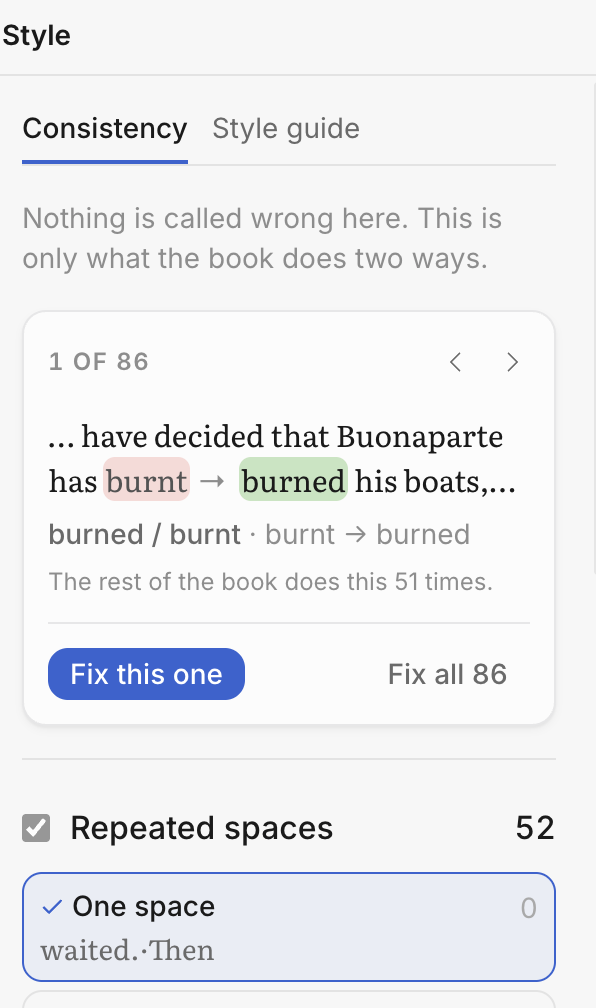
Typical findings: spelling variants (analyze / analyse), the serial comma present and absent, numbers under a hundred in words or in figures, repeated spaces, inconsistent dashes, a quotation opened and never closed.
Each finding shows the sentence, both forms, and how often the book does it each way. A quotation is shown whole — opening mark, the words, closing mark — rather than one end at a time. Under a rule, a line says where its work is: Mostly in chapter seven, 40 of 42 is a chapter pasted from elsewhere, and you can press it to go there.
Fix this one applies your choice here. Each rule has its own Review 42… on its row, and
the card’s Review all 162 in 5 rules… takes everything that is switched on. Both open the
list before anything changes: every sentence that would, chapter by chapter, with the change
written into it, and Apply at the bottom.
Untick the ones you want left alone — or skip a whole chapter — and press the arrow beside a
change to go and look at it in the manuscript. It is one edit, and ⌘Z takes all of it back;
the history calls it Fixed 162 style points.
Looking before deciding
The eye beside each form walks every occurrence of it in the book, the ones that already conform included — every serial comma, every burnt. Nothing is offered on a stop that needs no change. Press the eye again, or the cross on the card, to stop.
Your decisions travel with the book
The form you settle on, and the guide you pick, are saved in the book itself. They are the same on
your other devices and ⌘Z takes them back like any edit. Which rules you switch off is not saved:
that is a way of looking, not a decision about the manuscript.
Style guide
Checks against a named guide rather than against the book’s own habits. Each finding says which guide asks for the change.
| Language | Guide |
|---|---|
| English | Chicago Manual of Style (18th edition), New Hart’s Rules (2nd edition) |
| French | Lexique des règles typographiques en usage à l’Imprimerie nationale (2002) |
Use Consistency to make the book agree with itself, and a Style guide when a publisher has asked for one.
Quotation marks
Top right of the studio.
Converts typewriter marks to typeset ones across the whole book.
| Typed | Becomes |
|---|---|
' |
’ — apostrophe or single quote |
" |
“ “ — opening and closing double quotes |
-- or --- |
— an em dash; between two numbers, -- becomes an en dash (1914–1918) |
... |
… — an ellipsis |
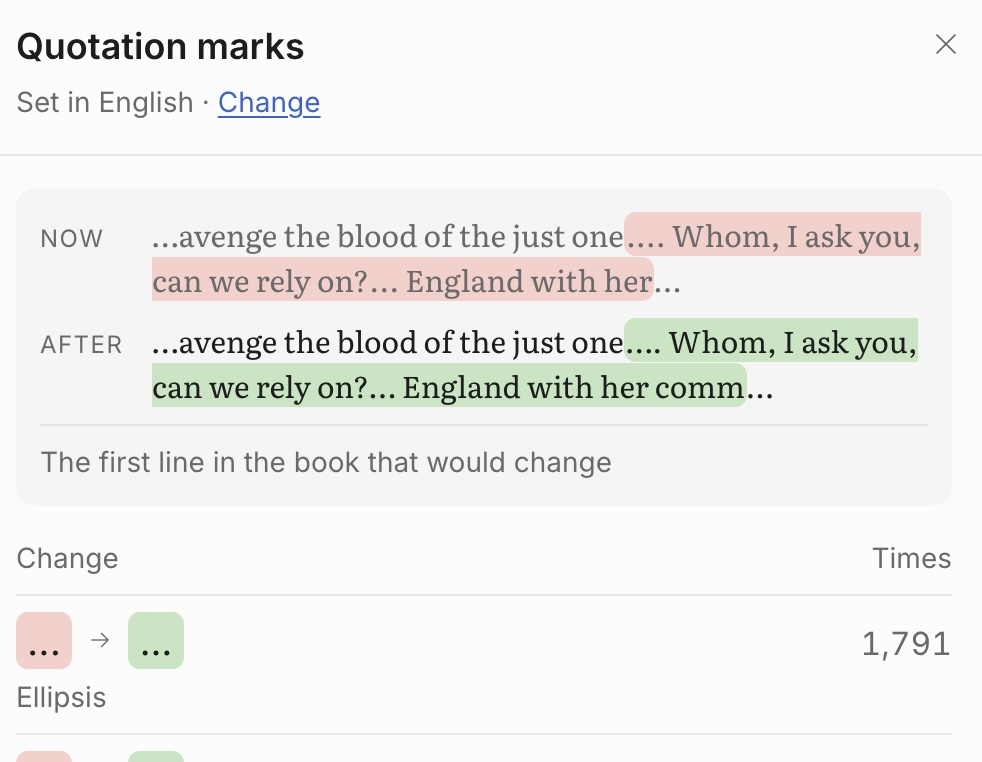
The dialog lists what it found and what it will change, grouped by kind, before you convert anything.
An apostrophe and a closing single quote are the same character, which is why a straight ' cannot
be converted correctly by rule alone in every case. The dialog shows the first line in the book that
would change, before and after, so you can check what it decided — and the conversion is one edit,
so ⌘Z takes the whole of it back.
Version history
Top right.
Every save on this device, grouped by day — today, yesterday, then dates.
Most rows are just a record of what happened: the edit is already in the book, so there is nothing to bring back and no button.
A row does carry Re-apply when it holds a version that was set aside rather than committed. That happens when the same block was edited on two devices: the remote version wins, and yours is preserved here instead of being lost. The count in the button’s label — History · 2 kept — is how many are waiting.